Showing posts with label How to. Show all posts

Thursday, 12 October 2017

How to Access Dark Web ?

Dark web is the dark side of World Wide Web where all illegal work done by criminals. Every banned thing available in this place. Most of prohibited things include drugs, guns, pornography, hire hackers, human body part etc. Most of IT company also transfer their data through dark web. Leaked alien’s video of NASA also available inside this platform. We are going to share with you, how to access this part of World Wide Web. We also suggest you don’t do any illegal activities otherwise cyber security expert will track you.

Dark Web

Instructions before access:-

Before access, you have to aware about Trojan, worm, spy & key logger. How all these software work and what is the process for decode these Trojan. When you access dark web without knowing anything, hackers control your PC with these viruses.  So be aware of it before access. We suggest you use Kali Linux system before access. Windows is a graphic base system. 


Chances are very high for attacker to access your system. Linux is pretty much command-based system. When you are using command base system very few chances left for attacker to control your system.


Below are the steps for access:-

1). Download Tor Web browser form it’s official website (torproject.org). Both version for windows and LINUX are available. You can choose one of these and install it. We will show you installation through window 10.

Tor Installation

2). When Tor installed in your system. It shows you two option, you can choose first direct connect option when your ISP(Internet Service Provider) doesn't block Tor access. 
The second configure option for when Tor network banned in your country.
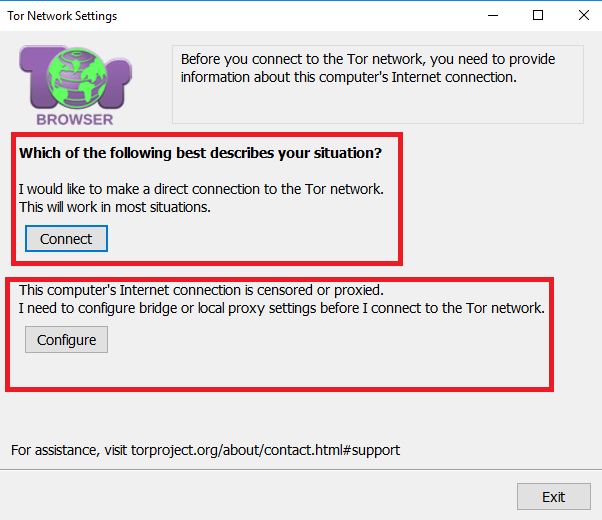


Tor Installation

3). If your ISP block Tor network you can choose yes option otherwise select no. 

Tor Installation


4).  If your system connect with local proxy  you can configure local proxy setting. Otherwise select no option. After that it will take some time to connect. You can see homepage like this when Tor connect with your ISP.

Image result for tor browser homepage window 10
Tor Installation
5). Now go to privacy and security setting and set security level high and click OK. When you set  level of security high, browser java script stop working. You don't even access Google. Now you're protected with Tor high level security layer.

Image result for security level of Tor
Tor Installation

 6.) If you want to find Dark web website Hidden Wiki is the best  option where all .onion extension site available. When you connect Tor and VPN together 99% chances are impossible to track IP particular location. 


This tutorial only for education purpose. We are not responsible for any type of damage.

What is Deep Web & Dark Web

There is two type of the web on the internet. One is called surface web which normal people should use through a web browser like Google Chrome, Mozilla Firefox, Opera, Safari etc. and the second one is called Deep Web and dark web.


Dark Web

Today we will discuss the topic of dark & deep web. Both are the platform of the internet where all of the illegal activities has been done by cyber criminals. These activities include drugs supply, child pornography, hire hackers, any of work which is situated as illegal. 


Deep Web content cannot crawl by various search engine bot's because it's restricted or available in the form of box. Search engine only index URL so not possible for search engine to crawl it. Its content available in in many website in the form of box. It can access by VPN. You can't imagine how bigger deep web is. We will give you one eg. One man standing in the room, his head is called surface web which is around 10% and 90 % body cover with the deep web. Now you know how big 
ger this is. 

Deep Web

Dark Web is also the part of the deep web. You can called it as more deeper side of the internet. Special software  required for access drark web. This special software called Tor. It is also named as onion root where multiple proxies chains are connected together to secure user actual IP. Bitcoin is the primary currency of this platform. Criminals buy and sell thing's through this cryptocurrency. Dark web domain extension is denoted with .onion. Every single domain who is with .onion extension is dark web domain. Our opinion for you, never access this platform without any knowledge. Because when you enter in this web your PC definitely control by hackers. After that,  they should do everything with your computer system what they want.

What Are The Basic Steps For Becoming Hacker ?

Hacking is a type of computer skill that can use to gain access personal computer and files without admin permission. Most of teenager wants to make a career in Hacking. Likewise, they want to become a cyber security expert. Today we are going to share some point's that are very useful to become cyber security expert.

How to Become a Haker

Yes, hacking is a crime, but it’s depending on you why do you want to do, for good work or bad. Our openion for you, choose always good work. And if you want to go through wrong side then it’s your choice. How big hacker you’re one-day cyber security expert will definitely track you. So, do always good job not bad. In cyber world, there are three types of hackers.

1. White Hat (Ethical Hackers):- These are those people who did their job for a government organization. They're using their computer skill for doing a good work. Like protecting user data from cyber criminals, finding the bug in security system etc. They always did a good job. 

2. Grey Hat:- These types of hackers do good and bad things. In simple meaning, these are those people who not in the side of white hat hacker or not inside of black hat hackers. 

3. Black Hat:- These are the bad guys you can call them cyber criminals who always want to do illegal things.

These are the main category of hackers. Now it’s your choice where you want to go. Want to do well, or want to mix bad and good or only want to bad. 

Coming to the main point, hacking is not easy in today time. Most of the websites and device are encrypted by 128-bit and 256-bit encryption. In past, encryption is used but not in a way like this. Now maximum device and websites are protected by high-end encryption. For a normal computer, doesn’t possible to break that encryption. That doesn’t mean you can’t hack anything. Below are the basics steps for starting a career in cyber security. 

Kali Linux 2017 Logo

1. You have to start with basics network concepts like cryptography, networks protocols, and data layers. 

2. Gain knowledge about spy, worms, key logger how all these Trojan works.

3. You also have to aware about proxy, online proxy, VPN how these tools hide your online identity. 

4. If you want to start hacking, privacy is very important. Start using Tor onion root browser and learn about it. This is the securest browser in the world. 

5. Start learning programming language Python, C, C++. These are very important language when you want to run a command or want to make any type of software. 


6. The main concept in hacking is Kali Linux. It is one of the best-operating systems design for hacking. It offers offensive security that use to protect your system from online threat. It has more than 600 inbuilt tools that are useful in hacking. Some of most popular tools are penetration testing stress testing, air cracks hydra etc. Python language is used in  Kali Linux command shell. Learn this language if you want to know more about Kali.


These are some basics step for start learning about hacking. If you want to go deeper in hacking choose networking course. In our next article, we will give you a deep introduction about Kali Linux. 

HOW TO HACK WIFI HOTSPOTS WITH LINUX

Hacking Wifi Hotspot by CyberFoxes

How does it work?
You all know that moment: the happy moment that you find a public hotspot followed with the dissapointment because of a pop-up thats asks for a login-code.
Everyones #1 frustration, atleast it is mine. Now you can either be a nice guy and buy one of those cards, or you can be stubborn and try to hack stuff.
We’re going for the second one.
The security on these hotspots are usually based on MAC-addresses.
The router has already been set-up to decide which computers can and cannot use the internet.
During the login process, access is given to the internet with a code: your MAC-address is being saved in a sort of database.
This will stay there for a couple of hours, depending on how much you payed for. After these hours are over,
the MAC-address will be automaticaly removed from the database that’s from the router, and your access to the internet will be removed.
If you don’t have one of these cards, you won’t be able to use the internet either.
But you are however connected to the network (Atleast the connection to the network that connects you to the login page.)
You might feel it coming already, you can pry/spy into the network! What we will do isn’t really difficult and I will sum it up in three steps:
1. Look which devices are connected to the network (Which MAC-addresses have internet.)
2. Change your MAC-address to a MAC-address with access to the internet.
3. Re-connect to the Access Point, the Hotspot.
Once you connect to the network again, the router will recognize you as an user that paid to
use the internet and it will grant you access to the internet.
Execution
It’s best if you have Linux to execute this. I myself use Kali Linux, but any distro should work.
Open your terminal, we will turn off our wlan interface. Type:
Code:
ifconfig wlan0 down
Now we will put our network interface in a monitor mode:
Code:
iwconfig wlan0 mode monitor
And now we will check if that actually happened:
Code:
iwconfig
Now we will look for all networks nearby you. These networks will then be shown with a BSSID MAC-address.
Code:
airodump-ng wlan0
Wait a while untill your ‘target network’ appears and then copy the BSSID that belongs to it.
Then press CTRL+C to stop airodump-ng. Otherwise it will endlessly continue to search for networks.
Now we will look for every device on the network.
The devices are the computers that are connected to the network and are shown in the form of a MAC-address.
It can take a while before these computers are found. It’s important to wait a while to see which MAC-address has alot of traffic.
This is the one that we will use, copy the MAC-address.
Code:
airodump-ng -bssid [MAC ADDRESS OF THE NETWORK HERE] wlan0
Then:
Code:
ifconfig wlan0 down
And then we can change our MAC-address to the one which you choose:
Code:
maccchanger -m [MAC ADDRESS OF THE COMPUTER WHICH YOU CHOSE] wlan0
Now you will get a verification that your MAC-address has changed.
If you successfully did this, we will change our interface again in ‘manage mode’:
Code:
iwconfig wlan0 mode manage
Then turn on our WiFi-adapter again:
Code:
ifconfig wlan0 up
Check to see if it’s on:
Code:
ifconfig
Now you will go to the network interface GUI. Connect again with your Hotspot and you can enjoy your free internet.
Conclusion:
As you can see you can have access to the internet in a few easy steps.
The way around the security in this way is much faster and the chance to succeed is much faster than the standard way of WEP/WPA2 hacking.

Popular Posts


Types of SQL Injection

SQL injection is a code injection method, used to attack data-driven applications. This vulnerability allows a hacker to submit crafte...

Blog Archive